How to deliver music to Apple Music Classical: what an artist needs to know
Why exactly the third Saturday in September?
Apple Music Classical is not yet another separate streaming service where you need to deliver the same release again. It works within the Apple Music ecosystem, and the catalogs of the two apps are linked. Apple explicitly speaks about a shared music library between Apple Music and Apple Music Classical.
That is, the music is delivered into Apple’s ecosystem through a distributor, and then a completely different factor becomes key — whether Apple correctly understands your release as classical music and whether you have provided enough data for it to catalog it properly.
That is precisely why, in the case of Apple Music Classical, metadata becomes almost as important as the audio file itself.
Why “Artist — Song Title” is not enough for classical music
With standard popular music, the structure is relatively simple. There is an artist, a song title, an album, writers, and other recording contributors.
In classical music, it is more complicated.
Take Beethoven’s Fifth Symphony. There is one work, but there can be hundreds of recordings. They are performed by different orchestras, under different conductors, in different years. The symphony consists of movements, and Beethoven himself is the composer, but certainly not the performer on a specific recording.
It is precisely because of this complexity that Apple explains the need for a separate Classical app: one work can have many recordings and different titles, including in different languages. Therefore, the usual search model by artist and song title is not enough for classical music. Apple Music Classical allows you to search, among other things, by composer, work, conductor, and even catalog number.
A typical recording
Ludwig van Beethoven — Symphony No. 5
does not describe who exactly performs the music, who conducts it, which part of the symphony we are listening to, or which exact work it is in the composer’s catalog.
Instead, properly structured data allows Apple to understand the relationship:
composer → work → movement → performer → orchestra → conductor → specific recording.
That is one of the fundamental differences in delivering classical music.
Start with the correct genre
According to the current Apple Music Style Guide, the Classical genre is intended for Western art music — broadly understood as the tradition from around 800 AD to the present. For such albums, Classical should be the primary genre, and additional classical subgenres may be used for more precise classification. For example, Apple cites an album with Bach’s cello suites using the additional descriptors Cello, Baroque Era, and Solo Instrumental.
And here it is important not to try to send any instrumental music to Classical just because it has piano, violin, or orchestra.
Apple separately uses the Classical Crossover category. It may include popular music performed in a classical style, classical repertoire in a popular arrangement, or music with a classical aesthetic aimed primarily at a non-classical audience.
At the same time, Apple explicitly notes that Classical and Classical Crossover should not be used for music outside the Western art tradition — for example, new age, meditation, folk, or soundtracks simply because they use academic instruments.
In other words, “instrumental” does not equal “classical.”
Composer and performer are different roles
This is probably one of the most important things when preparing a classical release.
Apple requires at least one composer to be listed at the track level. All composers represented on the album must also be listed at the album level; up to ten composers can be entered there.
At the same time, Composer does not mean Primary Artist.
A composer should not be marked as the primary artist simply because they wrote the work. Apple even gives an obvious example: Beethoven died long before recording technology existed, so he cannot be the primary artist on a modern recording of his music.
A composer can also be Primary only when they are actually involved in the performance — for example, as a soloist, accompanist, or conductor.
This is especially important for contemporary Ukrainian composers. If you wrote a piano piece and performed it yourself, in the metadata you can be both Composer and performer at the same time. If your work is performed by another pianist, the composer and performer must be separated.
Likewise, the librettist or lyricist should not automatically be assigned the Composer role. Separate roles exist for them: Lyricist and Librettist.
So who is the primary artist?
For classical music, Apple has a separate Primary Artist logic.
For example, if a symphony is performed by one orchestra under one conductor, both should be listed as the album’s primary artists.
For a concerto, the primary artists at the track level may be the soloist, orchestra, and conductor. For a sonata for violin and piano — the violinist and the pianist. For a choir with orchestra — the choir, orchestra, and conductor.
Various Artists is not used at the track level. For classical recordings, Apple also does not recommend substituting these roles with the usual Featuring or With.
In other words, a classical release requires much more detailed crediting of participants.
And this is not just a matter of making the credits look nice. These data help Apple Music Classical build links between performers, works, and recordings.
How to correctly name a classical album
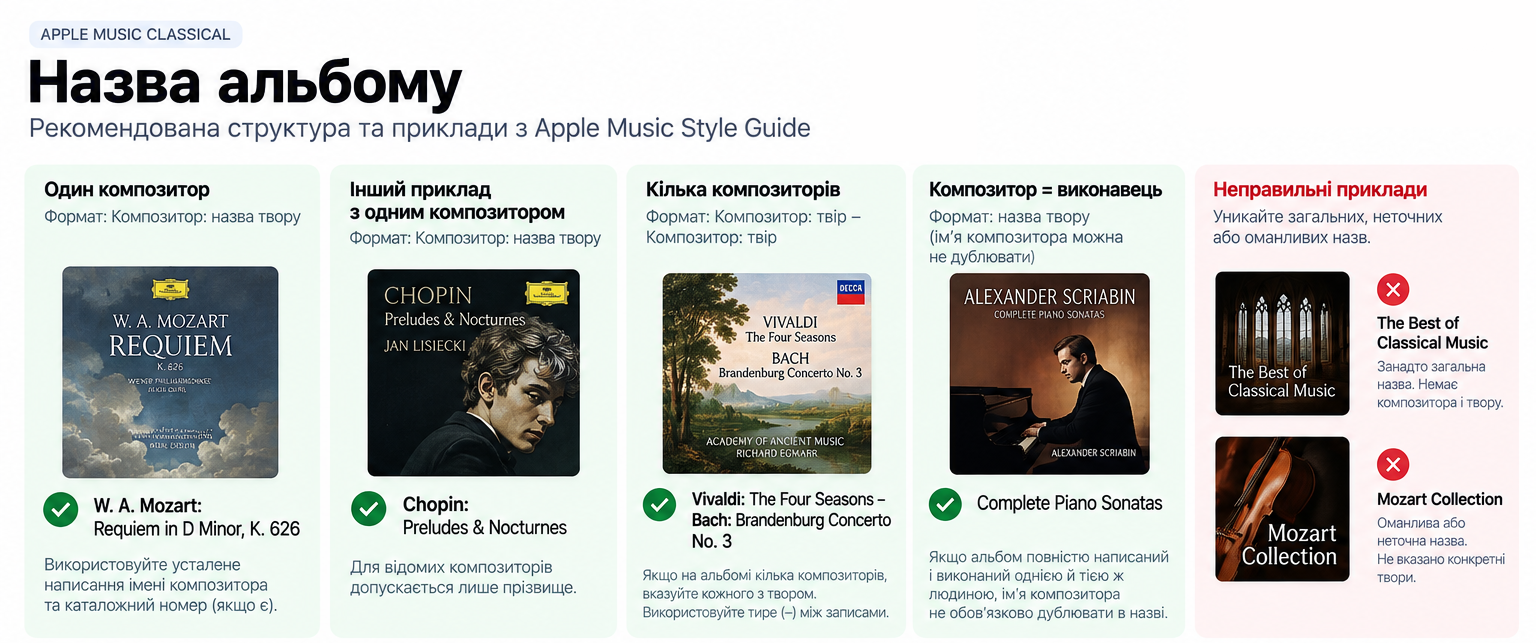
The Apple Music Style Guide has separate rules even for titles.
For a classical album, Apple recommends the structure:
Composer: title of the work
or, if several composers are represented:
Composer: work – Composer: work
For example, in its own Style Guide Apple uses the following formats:
W. A. Mozart: Requiem in D Minor, K. 626
or
Chopin: Preludes & Nocturnes
If the album is entirely written and performed by the same person, the composer’s name does not have to be duplicated in the album title.
For well-known composers, Apple allows only the surname. If there are several well-known composers with the same surname, initials are used — hence the familiar J. S. Bach, rather than simply Bach in situations where clarification is needed.
Apple also recommends following the established spellings of composers’ names already used in the Apple Music catalog, and for verifying classical works and catalog numbers it refers, in particular, to International Music Score Library Project.
The track title is even more important
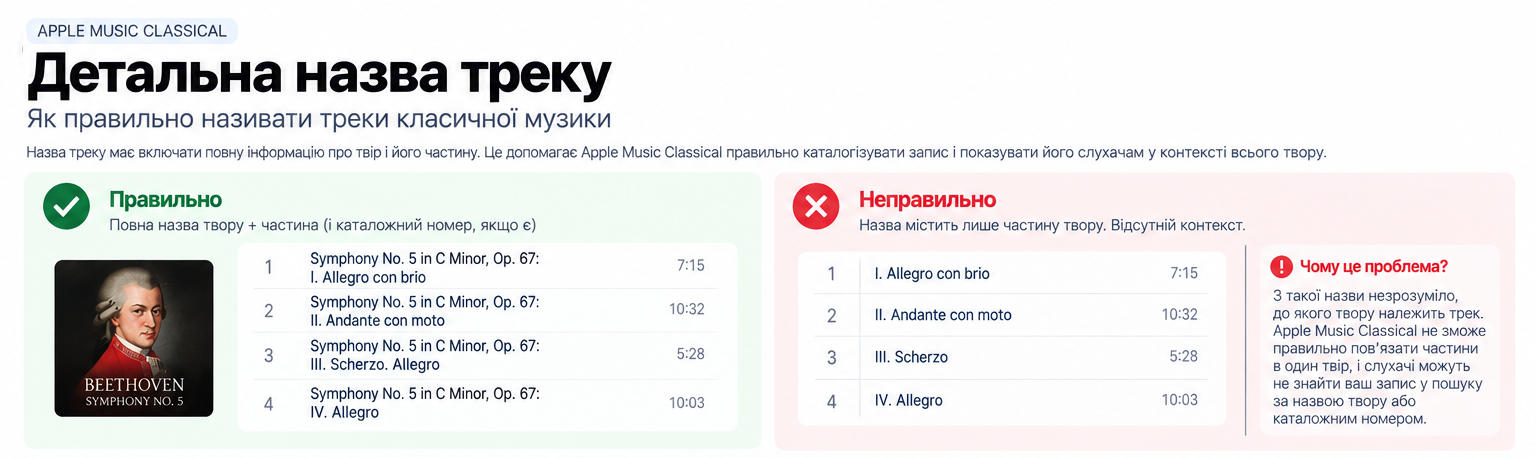
In classical music, the title of an individual track should make it clear which work this movement belongs to.
So instead of:
I. Allegro con brio
it is more correct to present the full structure:
Symphony No. 5 in C Minor, Op. 67: I. Allegro con brio
Apple requires you to start the title with the larger work if the track is part of it. If the work has a catalog number, that should also be included.
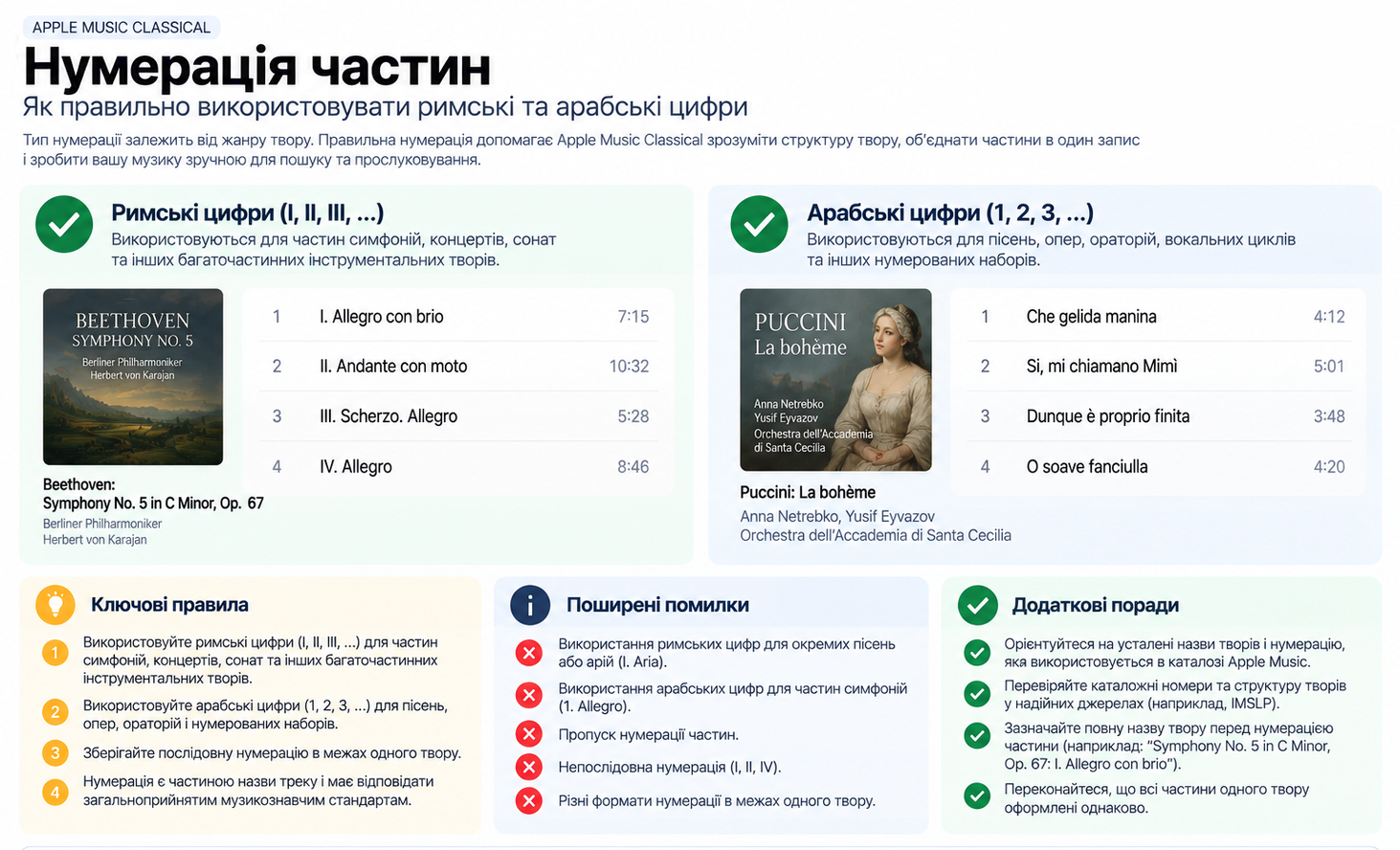
Roman numerals are used for movements in symphonies, concertos, and sonatas:
I. Allegro
II. Adagio
III. Presto
For songs, oratorios, and numbered sets, use Arabic numerals.
Apple also sets out punctuation logic. A colon separates the title of the work from the movement:
Cello Suite No. 1 in G Major, BWV 1007: I. Prelude
A period may separate the movement title from the tempo marking:
Symphony No. 2 in D Major, Op. 36: III. Scherzo. Allegro
And a commonly known title of the work may be put in quotation marks:
Piano Sonata No. 14 in C-Sharp Minor, Op. 27 No. 2 “Moonlight”: I. Adagio sostenuto
It is precisely these details that allow Apple to understand that it is not four independent “songs” before it, but four movements of a single musical work.
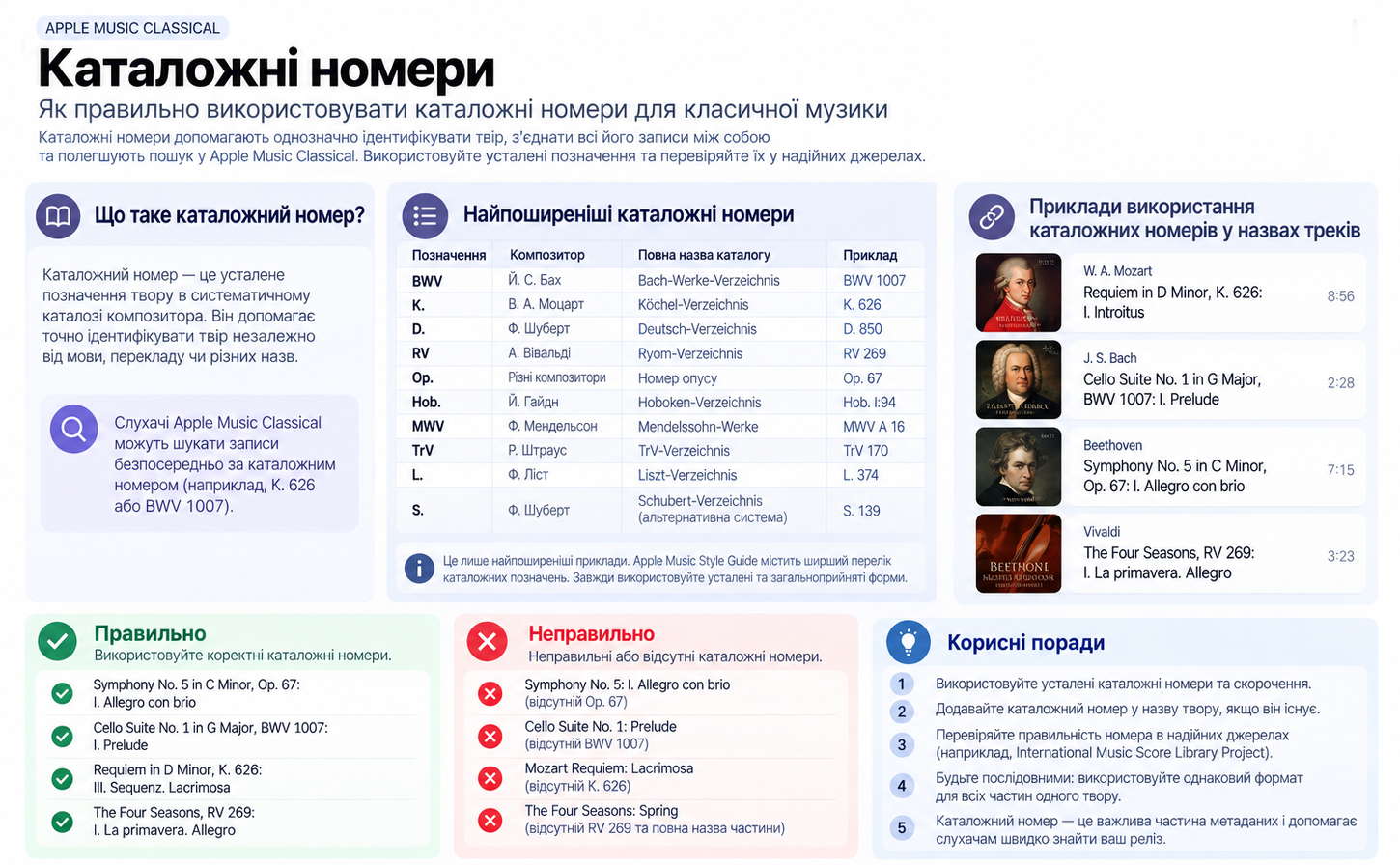
Catalog numbers are not unnecessary academicism
BWV, K., Op., D., RV, and other designations for classical music have practical value.
They help identify a work unambiguously.
For example:
BWV — the catalog of works by Johann Sebastian Bach;
K. — the catalog of works by Mozart;
D. — the Schubert catalog;
RV — the Vivaldi catalog;
Op. — opus number.
Apple has a list of standard abbreviations and recommends using established catalog numbers. This is especially important because in Apple Music Classical a listener can search for a recording directly by catalog number.
That is why, for classical music, metadata is quite literally part of the release’s search optimization within the platform.
What about contemporary authored classical music?
Here the question often arises: what if I’m not recording Bach or Mozart, but writing contemporary concert music myself?
That is not a problem.
Apple defines Classical not only as historical music from past centuries. The category also includes contemporary music if it falls within the tradition of Western art music.
So a Ukrainian composer in 2026 can absolutely create a release for Classical.
But here again, metadata structure matters.
For example, if Maria Kovalenko wrote a contemporary cello concerto performed by Oleksii Petrenko together with an orchestra under the direction of a conductor, it is not enough simply to write:
Maria Kovalenko feat. Oleksii Petrenko — Cello Concerto
Maria must be correctly identified as Composer, Oleksii as the solo performer, and the orchestra and conductor must be credited according to their roles, while the movements of the concerto should be formatted as movements of a single work.
Arrangements and transcriptions must also be indicated
If you have taken a classical work and changed its instrumentation, Apple asks you to reflect that in the title and name the arranger.
For example, the format may look like this:
Gianni Schicchi: O mio babbino caro (Arr. for Piano by Arthur Smith)
For a transcription:
Toccata and Fugue in D Minor, BWV 565 (Transcr. for Orchestra by Leopold Stokowski)
If all the movements of a single work are arranged the same way by the same arranger, the arrangement information is placed after the title of the work and before the designation of the specific movement.
This brings us back to the main idea: Apple wants to understand not just the name of the audio file, but the origin and structure of the musical work behind that recording.
Do not confuse Classical with Classical Crossover
I want to draw attention to this separately, because this is where it is easy to make a mistake.
If you made an electronic version of The Nutcracker, recorded a pop composition with a string quartet, or performed a well-known classical melody in a modern popular style, this may be Classical Crossover rather than Classical. And the formatting rules here are a little more flexible.
For example, Apple allows you to start the title with the popular name of the movement and move the large work and catalog number into parentheses:
Dance of the Sugar Plum Fairy (From “The Nutcracker”, Op. 71)
or
Moonlight Sonata (First Movement from Piano Sonata No. 14, Op. 27 No. 2).
This is an important distinction, because Apple explicitly limits the special Primary Artist rules for classical music to the Classical genre — they do not automatically apply to Classical Crossover. Technical delivery still takes place through the distributor
And now we return to the main question:
how do you deliver your music to Apple Music Classical?
You do not need to look for a separate Apple Music Classical form and upload the release there a second time.
Your distributor delivers the release to the Apple Music catalog along with the metadata. For classical content, it is critical that the distributor support a sufficiently detailed metadata structure: the Classical genre, composers, performers, conductors, orchestras and ensembles, titles of works, movements, catalog numbers, and other relevant credits.
This is where the practical problem arises.
Not every release upload form that works perfectly for a pop song is sufficient for classical music.
If a distributor only allows you to provide “Artist — Track Title — Songwriter,” some of the information needed for a full presentation of a classical recording may simply never reach Apple.
That is why, before uploading a release, you should ask your distributor whether it supports Apple’s expanded metadata for Classical.
What to check before submitting a release
I would reduce the preparation of a classical release to one simple principle: Apple needs to receive enough information to understand not only who uploaded the recording, but exactly what was recorded and who performed it.
Before delivery, check the genre and make sure Classical really fits the music; properly separate Composer and performers; list all principal performers in accordance with the structure of the recording; verify the established spelling of the composers’ names; provide the full titles of the works and movements; add the key and catalogue number where they exist; format all movements of one work consistently; indicate an arrangement or transcription if the original work has been altered.
And, of course, the general rules of the Apple Music Style Guide remain in force, some of which we have already translated above: quality audio and artwork, accurate artist names, correct localization, no advertising in metadata or artwork, and properly cleared rights to the content.
Apple warns that content undergoes Quality Assurance review, and following the Style Guide reduces the likelihood of receiving remarks and delaying the release publication.
The main thing: Classical is music built around a work
It seems to me this is the simplest way to understand the entire logic of Apple Music Classical.
In popular music, we mostly move from the artist to the song.
In classical, another extremely important level is added — the work.
There is Beethoven as a composer. There is his Fifth Symphony as a work. There are four movements of this work. And there is a specific orchestra, conductor, and specific recording we are listening to now.
Apple Music Classical tries to bring these connections together into one system.
The more precisely the distributor passes Apple composer → work → movement → performers → specific recording, the greater the chances that the release will be cataloged correctly and found by exactly the audience for whom it was created.
Author: Pavlo Striletskyi